Page 1 of 1
Need help with my surround system
Posted: Thu Oct 30, 2008 12:39 am
by Arthur
Hi folks, I've tried searching on the Internet on how to connect my surround sound system to my laptop, but as it's kind of unstandard equipment, I need some help.
The parts I need help to connect, is:
my Logitech X-620
with my Zepto Znote 6224W.
The Logitech is actually a 6.1 system, but since my soundcard have support for 7.1 sound, this shouldn't be a problem.
The plugs is green, black & orange minijack type.
The Znote has not that many outputs, only a standard stereo minijack output.
But it has a S/PDIF output. First I thought it was only for S-Video, but Wikipedia states:
Later Dell laptops provide an SPDIF audio signal.
Zepto are a somewhat similar company to Dell, and the output on my laptop look similarly to this:

The problem is to find a bridge between these, and unfortunately I haven't succeded yet.
I've tried to research on the Internet, but I always end up with something else.
So you are one of my last hopes. I hope anybody with some knowledge on how to solve this would be kind and share it with me.
Thank you.

Posted: Thu Oct 30, 2008 10:50 am
by GeeJee
Is that supposed to be a digital output?

Hmm. If I were you, and I was sure that indeed is a digital output (strange to me, but still) - I'd go to a specialized audio shop and ask for such a cable.
Posted: Thu Oct 30, 2008 11:08 am
by Jon
That does look like a digital output.
Posted: Thu Oct 30, 2008 3:24 pm
by Analog Bend
I think this output isn't digital....is like a minidin connector...
The apperance is nearly a S-Video too, but the pins are in different position...
S-Video
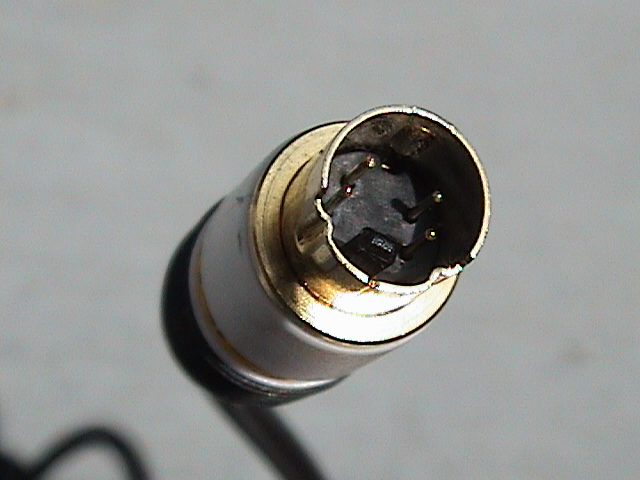
Your plug has three more pins than S-Video

Posted: Thu Oct 30, 2008 5:02 pm
by Arthur
Analog Bend wrote:I think this output isn't digital....is like a minidin connector...
The apperance is nearly a S-Video too, but the pins are in different position...
Your plug has three more pins than S-Video
Yep, as
Wikipedia states, it can use a standard S-Video only mini-DIN too. But it's the SPDIF audio signal I hope to acheive. The specs of my computer clearly states that my soundcard has 7.1 support. Therefore, the only logical connection must be this 7-pin non-standard mini-DIN connector.
Posted: Thu Oct 30, 2008 6:40 pm
by Analog Bend
This is an SPDIF plug:
S/PDIF on Wikipedia
Ts very different than mini-DIN
Posted: Thu Oct 30, 2008 7:44 pm
by Arthur
Well, OK, but to quote from the net shop I bought it from:
netshop.no wrote:7.1 Digital Surround Sound lydkort
Surround lydkortet med hele 7.1 digital lyd og med S/PDIF utgang gjør at du kan koble Zepto Znote 6224W direkte til ditt surround-anlegg og få enda bedre bilde-/lyd-opplevelse ut av denne multimediacenter PCen.
I guess that not everyone understands everything in here, but you get the grip from the few international words here.
Posted: Thu Oct 30, 2008 11:06 pm
by Analog Bend
Arthur wrote:Well, OK, but to quote from the net shop I bought it from:
netshop.no wrote:7.1 Digital Surround Sound lydkort
Surround lydkortet med hele 7.1 digital lyd og med S/PDIF utgang gjør at du kan koble Zepto Znote 6224W direkte til ditt surround-anlegg og få enda bedre bilde-/lyd-opplevelse ut av denne multimediacenter PCen.
I guess that not everyone understands everything in here, but you get the grip from the few international words here.
I didn't understand this... can you translate to english?
Posted: Thu Oct 30, 2008 11:14 pm
by Jarp2600
S/PDIF works trough a Toslink-cable, usually... Did you check both S/PDIF connectors on your surround system and the other thingie?
Posted: Thu Oct 30, 2008 11:33 pm
by Arthur
Analog Bend wrote:I didn't understand this... can you translate to english?
OK, I'll try. I'm not too good in english, but...:
netshop.no wrote:7.1 Digital Surround Sound soundcard
The surround soundcard with 7.1 digital sound and with S/PDIF output, makes it possible to connect Zepto Znote 6224W directly to your surround-equipment, achieving even a better picture-/sound-excperience out of this multimediacenter PC.
I guess the sentence is pretty bad, as it's almost directly translated from norwegian. But it'll have to do for this time.
Tomorrow I'll try to post some pics, so you may understand better how it looks like.
Posted: Fri Oct 31, 2008 12:19 am
by Velodynamic
I've tried to figure out what the D-Sub/VGA port on the Logitech X-620 are there for.

It looks (of the pictures I've seen through some googling) as if you're connecting the surround amp with 3 (analog) 3,5 phono plugs, black, orange, green - 1 front system channel, 1 back system channel and 1 sub channel.
Their cords seem to be attached to the D-Sub contact, if I'm not mistaken...

The RCA plugs are for the speakers as far as I can see, however I can not see any digital input on the X-620 at all?

If you have one right/left audio output only on your lap-top, it might turn out pretty weird.
In a worst case senarion you might need a USB audio computer interface with at least 3 analog surround outputs.
Just an opinion.

Posted: Fri Oct 31, 2008 12:41 am
by Arthur
Velodynamic wrote:I've tried to figure out what the D-Sub/VGA port on the Logitech X-620 are there for.
It looks (of the pictures I've seen through some googling) as if you're connecting the surround amp with 3 (analog) 3,5 phono plugs, black, orange, green - 1 front system channel, 1 back system channel and 1 sub channel.
Their cords seem to be attached to the D-Sub contact, if I'm not mistaken...
The RCA plugs are for the speakers as far as I can see, however I can not see any digital input on the X-620 at all?
Right you are in all of this. Thank you for taking the time to research!

Velodynamic wrote:If you have right/left channel output only on your lap-top it might turn out pretty weird.
That's right, and that's the problem.

Velodynamic wrote:In a worst case senarion you might need a USB audio computer interface with at least 3 analog surround outputs.
Yeah, per now it doesn't look too good. Maybe I should get one of these?
Sound Blaster X-Fi Surround 5.1

Posted: Fri Oct 31, 2008 1:03 am
by Velodynamic
Arthur wrote:
Yeah, per now it doesn't look too good. Maybe I should get one of these?
There you go! It seem to suit you much better.

Perhaps you could use an adaptor cord to transform the right/left RCA's front channel into a mini-jack plug-in type and you're all done (if you didn't have RCA's to the front ch that is?).


Posted: Fri Oct 31, 2008 1:13 am
by Arthur
Hmm, yes, that would be a good solution!
Only minus is that one of the speakers would not be used. :/